BZMINER
BZMiner is a miner that supports the mining of various cryptocurrencies and algorithms, including Ethash, KawPow, Octopus, and others. BZMiner is optimized for use with NVIDIA and AMD graphics cards, offering high performance and flexible settings.
BZMiner
BZMiner is a miner that allows you to mine various coins, including Bitcoin. BZMiner supports AMD and Nvidia graphics processors. The miner provides its users with the ability to optimize algorithms, which helps increase performance and reduce power consumption.
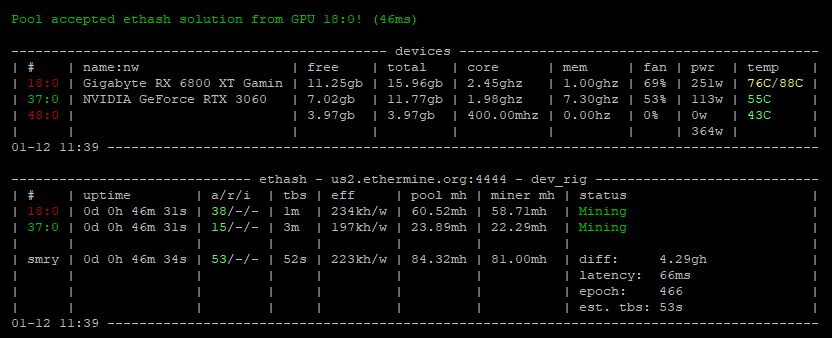
Algorithms and Fees
| Algorithm | Supported Devices | Developer Fee (%) |
|---|
Installing BZMiner
To start mining, you need to follow a few simple steps:
Download the latest version of BZMiner. You can do this from our website above (versions for Windows and Linux are available).
Extract the downloaded archive to a convenient location for you, such as your desktop.
Open the BZMiner folder and choose the file for the algorithm you want to use for mining. Open the selected .bat file with a text editor, such as Notepad, and replace YOUR_ADDRESS and YOUR_POOL with your wallet address and pool information.
To start mining, double-click the .bat file you edited. For example, if you edited kawpow.bat, the miner will start mining Ravencoin using the Kawpow algorithm.
Below, you can find a more detailed guide on configuring the .bat file and download a ready-to-use file, where you only need to replace the wallet address with your own.
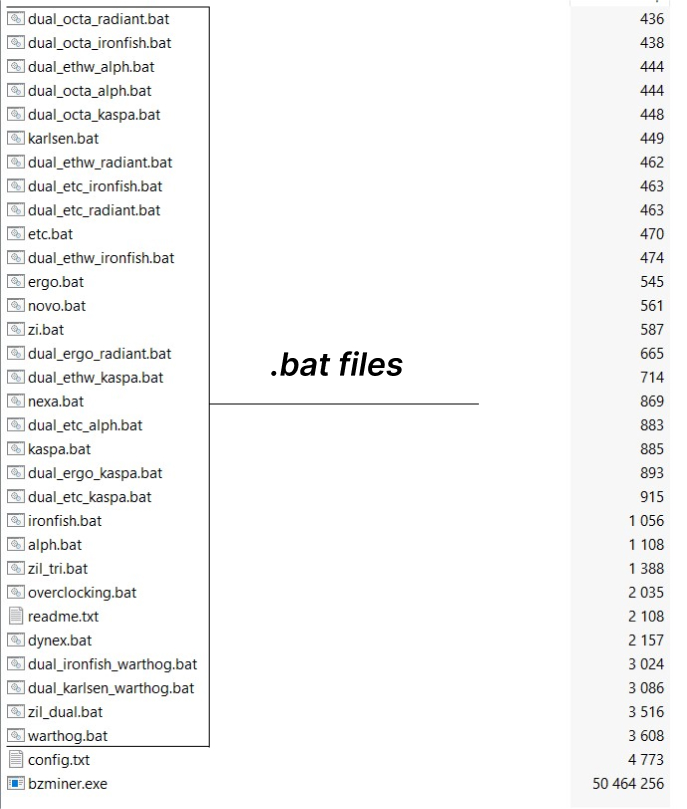
Configuring the .bat file for BZMiner
Below are examples of a complete .bat file setup:
Configuring the .bat file for Bitcoin:
- Algorithm sha256 (used for Bitcoin)
- Pool poolin.com
- Port 3333
- Replace
YOUR_BTC_WALLETwith your Bitcoin wallet address.

@echo off
cd /d %~dp0
:: mining Bitcoin on a pool
bzminer -a sha256 -w YOUR_BTC_WALLET -p stratum+tcp://btc.poolin.com:3333
pause
Configuring the .bat file for Ravencoin:
- Algorithm kawpow
- Pool 2miners.com
- Port 6060
- Replace
YOUR_RVN_WALLETwith your Ravencoin wallet address.

@echo off
cd /d %~dp0
:: mining Ravencoin on a pool
bzminer -a kawpow -w YOUR_RVN_WALLET -p stratum+tcp://rvn.2miners.com:6060
pause
Configuring the .bat file for Ergo:
- Algorithm autolykos
- Pool herominers.com
- Port 10250
- Replace
YOUR_ERGO_WALLETwith your Ergo wallet address.
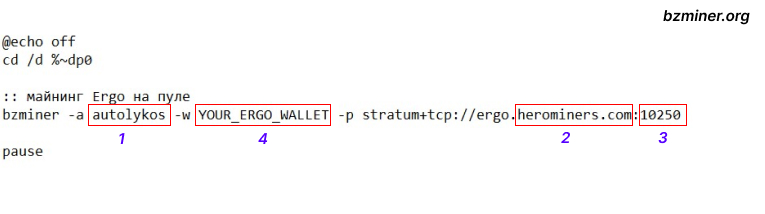
@echo off
cd /d %~dp0
:: mining Ergo on a pool
bzminer -a autolykos -w YOUR_ERGO_WALLET -p stratum+tcp://ergo.herominers.com:10250
pause
Configuring the .bat file for Ethereum Classic (ETC):
- Algorithm etchash
- Pool 2miners.com
- Port 1010
- Replace
YOUR_ETC_WALLETwith your Ethereum Classic wallet address.

@echo off
cd /d %~dp0
:: mining Ethereum Classic on a pool
bzminer -a etchash -w YOUR_ETC_WALLET -p stratum+tcp://etc.2miners.com:1010
pause
VIdeo Guid


Dual and Triple Mining
Dual and triple mining is a great opportunity to mine multiple coins at the same time. This can significantly increase your mining profits.
Dual Mining:
BTC + ZIL (Bitcoin + Zilliqa)
- Description: Dual mining of BTC and ZIL allows you to use the full power of your GPU for Bitcoin mining while also switching to Zilliqa mining after some time. This allows you to earn additional income from ZIL without a significant loss in hash rate for Bitcoin.
- Example configuration for the .bat file:
@echo off
cd /d %~dp0
bzminer -a sha256 -w YOUR_BTC_WALLET -p stratum+tcp://btc.poolin.com:3333
bzminer -a zil -w YOUR_ZIL_WALLET -p stratum+tcp://zil.flexpool.io:5555
pause
Kawpow + ZIL (Ravencoin + Zilliqa)
- Description: Using the Kawpow algorithm for Ravencoin mining with periodic switching to Zilliqa every few minutes to earn additional income. This method allows mining ZIL with minimal impact on the main RVN mining.
- Example configuration for the .bat file:
@echo off
cd /d %~dp0
bzminer -a kawpow -w YOUR_RVN_WALLET -p stratum+tcp://rvn.2miners.com:6060
bzminer -a zil -w YOUR_ZIL_WALLET -p stratum+tcp://zil.flexpool.io:5555
pause
Triple Mining:
BTC + ZIL + Kaspa
- Description: Triple mining allows you to mine Bitcoin as the main coin, Zilliqa for additional income, and Kaspa as an additional coin. Triple mining requires more configuration than dual or regular mining but allows you to use the full potential of your equipment.
- Example configuration for the .bat file:
@echo off
cd /d %~dp0
bzminer -a sha256 -w YOUR_BTC_WALLET -p stratum+tcp://btc.poolin.com:3333
bzminer -a zil -w YOUR_ZIL_WALLET -p stratum+tcp://zil.flexpool.io:5555
bzminer -a kaspa -w YOUR_KASPA_WALLET -p stratum+tcp://kaspa.2miners.com:2222
pause
Kawpow + ZIL + Ergo
- Description: This configuration allows you to mine Ravencoin, Zilliqa, and Ergo simultaneously. ZIL switches to mining every few minutes, which does not affect the main mining of Ravencoin and Ergo.
- Example configuration for the .bat file:
@echo off
cd /d %~dp0
bzminer -a kawpow -w YOUR_RVN_WALLET -p stratum+tcp://rvn.2miners.com:6060
bzminer -a zil -w YOUR_ZIL_WALLET -p stratum+tcp://zil.flexpool.io:5555
bzminer -a autolykos -w YOUR_ERGO_WALLET -p stratum+tcp://ergo.herominers.com:10250
pause
Optimized dual mining for such coins
Basic Commands List for BZMiner
Click any example to copy it to the clipboard.
You can also download the full list of commands in PDF or Markdown format.
API Configuration
BZMiner provides a convenient API interface for remote management of the miner. With the API, you can monitor mining status, retrieve device statistics, manage the miner, and fine-tune mining processes.
Main Commands for API Configuration
--http_enabledEnables or disables the API (0 — disabled, 1 — enabled).--http_addressSets the IP address for API access (e.g., 0.0.0.0).--http_portSets the port for API access (e.g., 4014).--http_passwordSets the password for API access.--update_frequency_msSets the API data refresh interval (in milliseconds).
Enabling and Configuring the API
To activate and configure the API in BZMiner, follow these simple steps:
Enabling the API
By default, the API is enabled, but for precise configuration, you need to add a command when starting the miner.
Example command to enable the API:
bzminer --http_enabled 1
Enabling the API
By default, the API is enabled, but for precise configuration, you need to add a command when starting the miner.
Example command to enable the API:
bzminer --http_address 0.0.0.0 --http_port 4014
--http_address: Sets the IP address on which the API will listen. By default,0.0.0.0is used, which means access from any IP.--http_port: Sets the port for the API. By default, this is4014, but you can change it to any available port.
Setting a Password for API Access
To limit access to the API and protect the miner from unauthorized access, you can set a password.
Example command to set a password:
bzminer --http_password YOUR_PASSWORD
Replace YOUR_PASSWORD with your desired password. Without setting a password, the API will be disabled.
Viewing the API through a browser
After activating the API, you can open a browser and enter the IP address and port to access miner information. For example, if you configured the API on port 4014, you need to enter the following in the address bar:
http://localhost:4014API Data Refresh Rate
By default, the API data is refreshed every 15 seconds, but you can change this interval using the following command:
bzminer --update_frequency_ms 10000
Here, 10000 is the time in milliseconds (10 seconds). You can adjust the interval as desired.
Example command to start the miner with API:
bzminer -a kawpow -w YOUR_WALLET -p stratum+tcp://rvn.2miners.com:6060 --http_enabled 1 --http_address 0.0.0.0 --http_port 4014 --http_password YOUR_PASSWORD
Now you can remotely monitor and control your miner through the API using a simple browser interface or third-party monitoring applications.
How to Choose a Multi-Pool Mining Strategy in BZMiner?
BZMiner offers several strategies for distributing load between pools, helping to maximize the performance of your mining:
Switches to a backup pool if the primary pool stops working.
Evenly distributes work between pools, switching when the current pool is idle.
Cycles between pools at specified time intervals.
Distributes load between pools based on assigned quotas.
Evenly distributes work across all active pools.
Example command for load distribution:
bzminer --quota "1;pool1.com:3333" -u user1 -p pass1 --quota "2;pool2.com:4444" -u user2 -p pass2
Try our quota calculator to optimize your mining strategy!